While uploading pictures from my latest trip to Kansas (you can go take a look at the album if you wish) to Facebook, I noticed something really neat: you can now add Alt Text for photos to any picture you’ve uploaded to Facebook!
This is big. Really big.
Alt Text is what a screen reader uses to describe a photo. It can be simple, or complicated (it’s best if it’s simple), but every image on Facebook can have alt text now, whether it’s a personal photo or a photo on a page.
Apparently, Automatic Alt Text was rolled out in 2016 (and I totally missed the announcement and the whitepapers). That process started essentially tagging things in the photo that Facebook’s AI was about 80% certain were in the photo for sure (so, a picture of a picnic might just be a string of things: “sunny day, food, picnic blanket, people smiling”). That’s way more context than “Image,” and that alone is huge.
I mean, imagine if you were browsing a Facebook feed the only information you had about a friend’s image post was the caption and the word, “Image.” That’s what using a screen reader on FB used to be like.
But we now have the opportunity with every photo that we upload to offer additional context so someone who is blind or uses a screen reader can receive some context around your photo post.
How to add your own alt text:
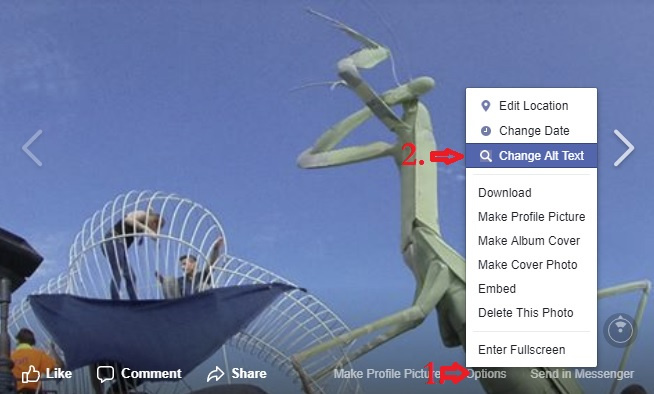
Start by opening a photo on your Facebook page. Click on the “Options” button, then select “Change Alt Text.” As of this writing, the following image shows an example of where to find this on the pic (desktop site):

Once in, you’ll see a list of items Facebook thinks are in the photo, and you’ll be given the option to override the Alt Text in a box. Type a good, short description in, and hit “save” (the image shows how to do this):

I encourage this for your personal photos, too, but especially if you run a page for a Grove, Coven, or any other community-minded organization, you should be overriding the alt text for every picture and making sure that the text is descriptive and to the point.
You have 100 characters to give someone a significantly better experience. Use them.
Now, if only Patreon would let me add alt text, I’d be really happy.